









2027 IPPS Final Rule
Featured article
CMS published the final rule for Hospital Inpatient Quality Reporting and Medicare Promoting Interoperability programs for FY 2027.
Primary keys in Data Repository define what makes each record unique and determine how tables relate to each other. Since DR has no foreign keys, understanding primary key columns is the only reliable way to write correct, performant joins.
Knowing which tables to use is one of the biggest challenges when writing DR reports. Understanding those tables, and the relationships between them is part of that challenge. Primary keys are a critical part of any database, especially so in the DR, since they are the only definition we have for how to correctly and quickly get information.
Remember the scene from The Wizard of Oz where Dorothy and friends first start out for the Emerald City? The Munchkins tell Dorothy how to find her way by singing about following yellow bricks. Similarly, we should follow this advice when writing queries from relational databases, and particularly MEDITECH's Data Repository: if you want the most efficient, best-performing reports, you should learn about and use the primary keys built into the DR databases.
Simply put, a primary key is what makes a record in a database table unique. Imagine a table of customers for a small business, each of whom has a customer number, a number that can only be used once and is different for each of them. This is the primary key.
Structurally, a primary key is defined for a table on the column (or more often, columns) whose values make the record unique. When defined, this is known as a primary key constraint, whose columns can't have any NULL (empty) values. This primary key also becomes the table's one and only clustered index, the physical structure that determines what order the data are stored in. The clustered index is also used to quickly retrieve data when called for by a query, stored procedure or application.
Another way to think of a primary key is that it helps you understand the level of detail contained in a table. The DR table LabSpecimens, for example, has one record for each unique specimen, but not more detailed data about test results for that specimen. Since our specimen is likely to have more than one test result associated with it, we use LabSpecimenTests to find data about the tests, one record per test, per specimen.
Let's see what this looks like when you use SQL Management Studio to browse the tables from a typical live DR database (these examples are based on simplified versions of actual DR tables):
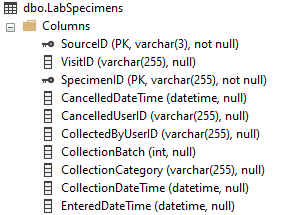
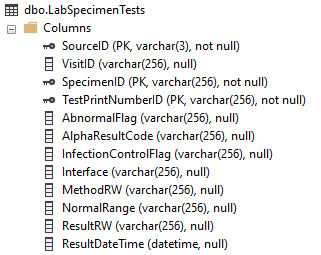
The key symbol indicates the primary key columns. Notice that the SourceID column is always the first column in a table, and always part of the primary key. This is universally true for all DR tables. For our LabSpecimens table on the left, the level of available detail is the SpecimenID, a single lab specimen. Like most DR primary keys, the "ID" portion of this column name indicates this is an internal identifier, not something displayed to the user.
You'll notice the LabSpecimenTests table on the right has three primary key columns: the first two identical to LabSpecimens (SourceID and SpecimenID) and a third column, TestPrintNumberID. We can infer a couple of things from this:
It's not a coincidence that those first two primary key columns are the same. Not only are they named identically in both tables, the data values they contain are the same too. Every unique combination of SourceID and SpecimenID from LabSpecimenTests has to have a related record in LabSpecimens. (How can you have a lab test if there is no specimen?)
For a detailed discussion of the importance of SourceID, read this blog.
This type of relationship between tables can be described as parent-child. In a true relational database design, these relationships are structurally defined and enforced using "foreign keys." However since the Data Repository doesn't have a true relational design, there are no foreign keys. When you need data from more than one table, you have to tell the server how to do it, using T-SQL join clauses in your queries and stored procedures.
The SQL programming language uses joins to combine fields from two tables when they share common data values. Using our lab examples from above, the relationship between these tables would be written like this:
SELECT ... FROM LabSpecimens JOIN LabSpecimenTests ON LabSpecimens.SourceID = LabSpecimenTests.SourceID AND LabSpecimens.SpecimenID = LabSpecimenTests.SpecimenID
Using the primary keys in SQL joins not only correctly tells SQL Server how the tables are related to each other, it is also critical for optimal query performance. Many poor performing queries or applications are the result of incomplete or incorrect join statements. You can avoid this pitfall by understanding what the primary keys are for the tables you're using.
Once you get in the habit of looking at primary keys, you'll quickly find that in most cases, they are unique to each MEDITECH application or module. While the keys we use within lab when working with specimens (including blood bank and microbiology) are common to each other, they are different from what you find in admissions, order entry or pharmacy. Let's see a few examples:
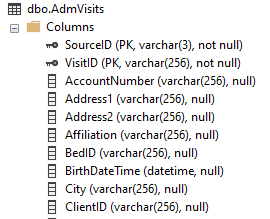
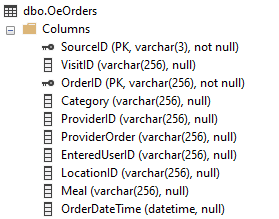
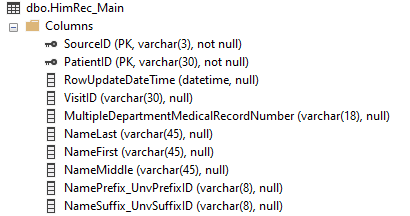
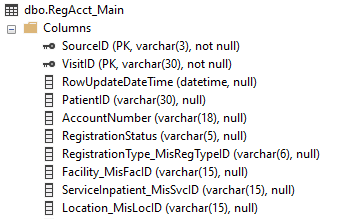
In each case, our primary key has the SourceID and one other "ID" column, with data values that are specific to that module. For ADM, we have a patient visit (represented with the user-friendly value of account number, VisitID). For OE, we have an ordered procedure (OrderID). In 6.x HIM, we have a PatientID, and in REG we once again see VisitID.
Once you know what a module's primary keys are, you can very quickly understand how to go from "top to bottom" within a module's data; that is, from a summary level to more detail. Imagine we want order information for OeOrders, and also want associated query information. If we follow the SourceID and OrderID columns from the first table, we'll find they also exist in OeOrderQueries, along with QueryID as part of the primary key. Now we know how to join these tables correctly for fast and accurate data presentation.
Knowing which tables to use is one of the biggest challenges when writing DR reports. Understanding those tables, and the relationships between them is part of that challenge. Primary keys are a critical part of any database, especially so in the DR, since they are the only definition we have for how to correctly and quickly get information. Think of the munchkins every time you write your SQL code and follow the guidance about primary keys.



.svg)